
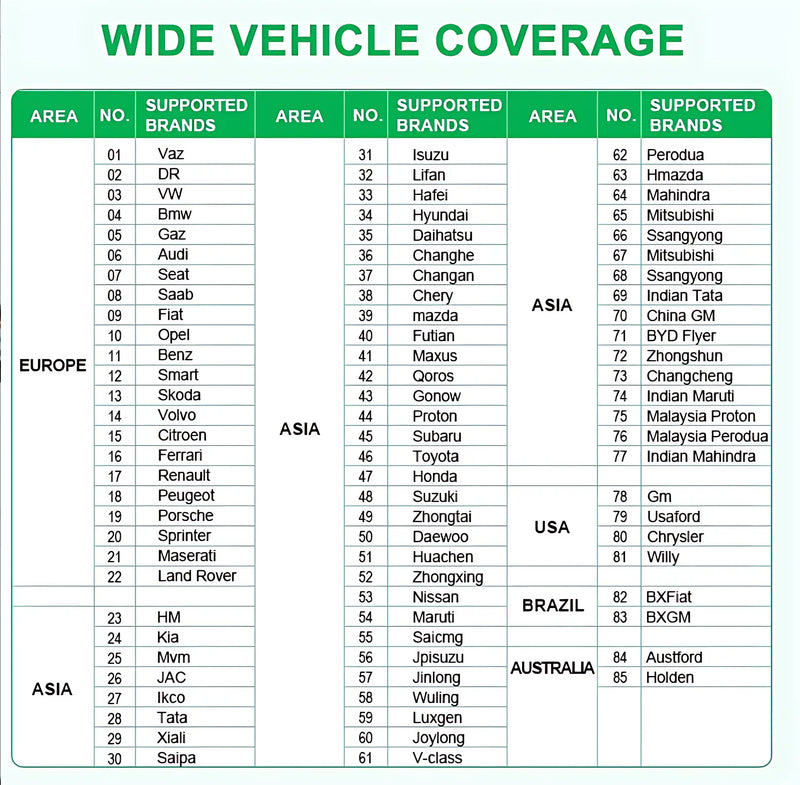
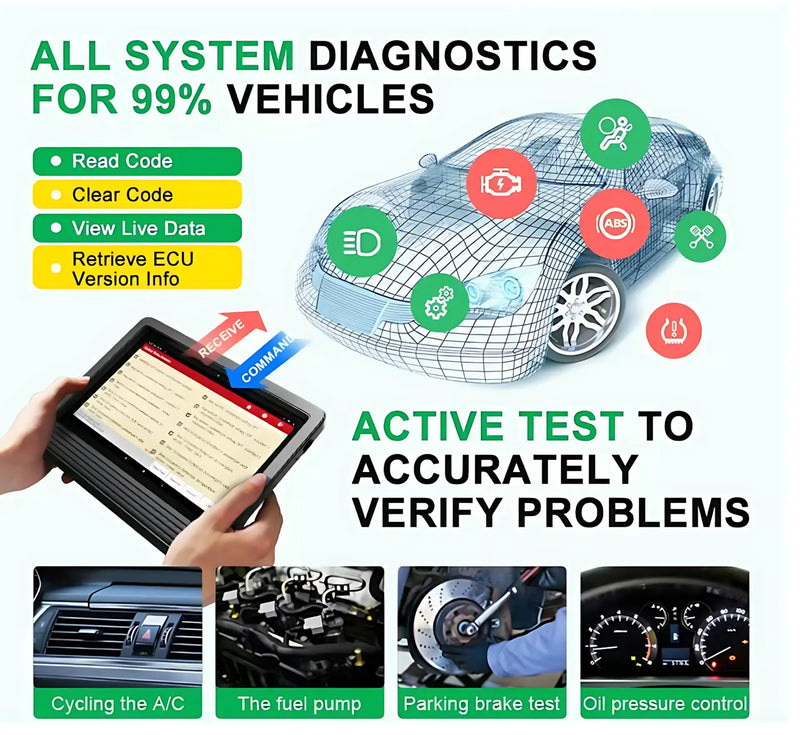
- Diagnóstico a nivel de fabricante:Es compatible con más de 150 marcas y el 99 % de los vehículos, incluidos los turismos de 12 V y los camiones pesados de 24 V, y ofrece un diagnóstico completo del sistema para el motor, el ABS, el SRS, el TPMS y mucho más.
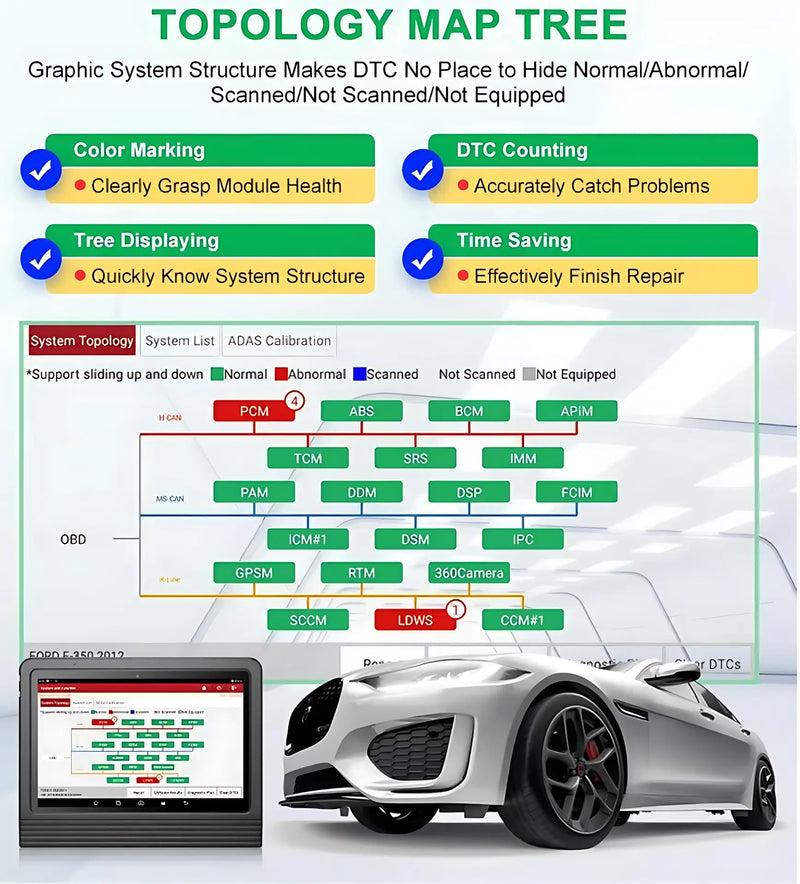
- Mapa de la topología del sistema:Una vista general visual y codificada por colores de todos los sistemas del vehículo permite identificar rápidamente las estructuras de comunicación y localizar con precisión los puntos de fallo, lo que agiliza el diagnóstico.
- Codificación y programación de la ECU:Las funciones avanzadas de codificación en línea, programación fuera de línea y gestión de la ECU permiten activar funciones ocultas, personalizar los ajustes y reprogramar los datos adaptativos tras la sustitución de componentes.
- Control bidireccional:Envía comandos directamente a las unidades de control electrónico (ECU) y realiza pruebas activas en las bombas de combustible, los frenos, el aire acondicionado, las ventanillas y otros componentes sin depender de los controles del vehículo.
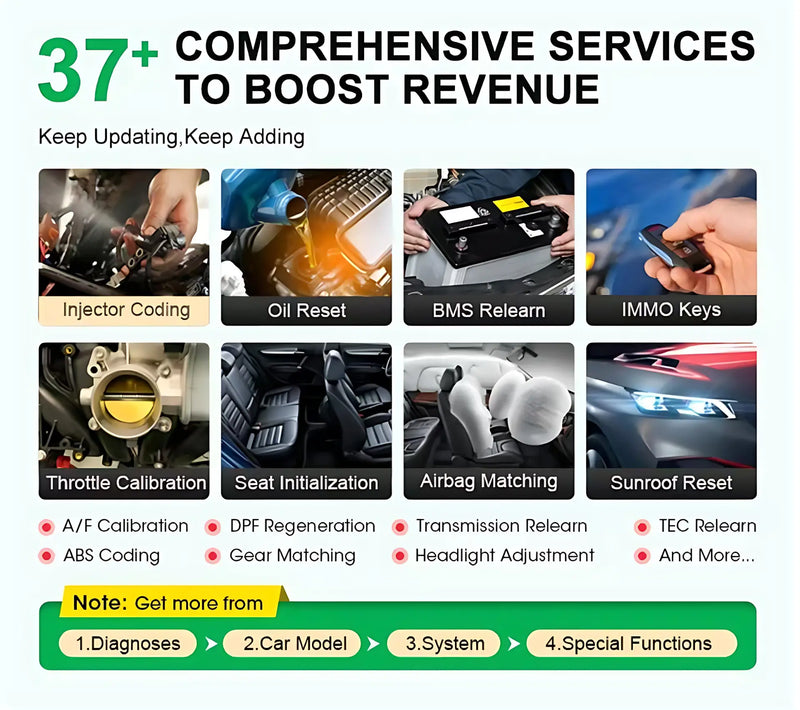
- Más de 45 funciones de mantenimiento:Amplia gama de servicios, que incluye codificación de inyectores, regeneración del DPF, reinicio del contador de aceite, EPB, BMS, llaves IMMO y mucho más, tanto para reparaciones rutinarias como complejas.
- Plataforma ampliable:Es compatible con módulos ampliados, como dispositivos TPMS, programadores de llaves, videoscopios, herramientas de calibración ADAS y comprobadores de baterías, para ampliar tu oferta de servicios.
- Herrajes de alta calidad:Incluye un procesador de 8 núcleos a 2,0 GHz, el sistema operativo Android 10.0, una pantalla de 10,1 pulgadas, 4 GB de RAM, 64 GB de almacenamiento y compatibilidad con los protocolos CAN FD y DoIP para garantizar un rendimiento preparado para el futuro.


X431 V+ 5.0 Herramienta de diagnóstico automotriz profesional global para todos los sistemas (incluidos los vehículos eléctricos)
Precio regular
$1,299.00
Precio de venta
$1,299.00
Precio regular
$1,688.70
Precio unitario
Ahorre 23%
Quick Answer
60-second summary
Escáner de diagnóstico automotriz profesional compatible con más de 150 marcas y el 99% de los vehículos globales, incluyendo coches de 12V y camiones de carga pesada de 24V. Incluye diagnósticos a nivel de equipo original, codificación de ECU, control bidireccional y más de 45 funciones de mantenimiento para todos los sistemas del vehículo.
Install time
5 minutos
Drilling
No, de conectar y usar.
Warranty
Sí, no invasivo
Guaranteed Fit — Zero Purchase Risk
Verified for your vehicle. If these parts don't fit, we cover return shipping and issue a full refund. No questions asked.
Confirm this fits your vehicle
Volume Discount — More Sets, More Savings
1 Set
Standard price
$1,299.00
2 Sets
Save 10% — $1,169.10 each
$2,338.20
$2,598.00
3 Sets
Save 15% — $1,104.15 each ★ Best value
$3,312.45
$3,897.00
-
Entrega estimada:Oct 12 - Oct 16
-
¡Envío aéreo exprés gratuito en pedidos superiores a $100!

X431 V+ 5.0 Herramienta de diagnóstico automotriz profesional global para todos los sistemas (incluidos los vehículos eléctricos)
Ajuste de Precisión Garantizado
Cada pieza verificada con datos OEM del vehículo. Garantizado que encajará en tu vehículo — o cubrimos el envío de devolución y reembolsamos el importe íntegro.
Diseñado para Plataformas EV
Piezas diseñadas para BYD, Tesla, MG, GWM y KIA — calidad de especificación OEM, probadas para sistemas eléctricos EV y compatibilidad de pinzas de freno.
Tus Piezas, Tus Condiciones
Pagos divididos con Zip, Afterpay o Shop Pay. Opciones sin intereses — aprobado en segundos en el checkout, sin formularios requeridos.
Características y Beneficios
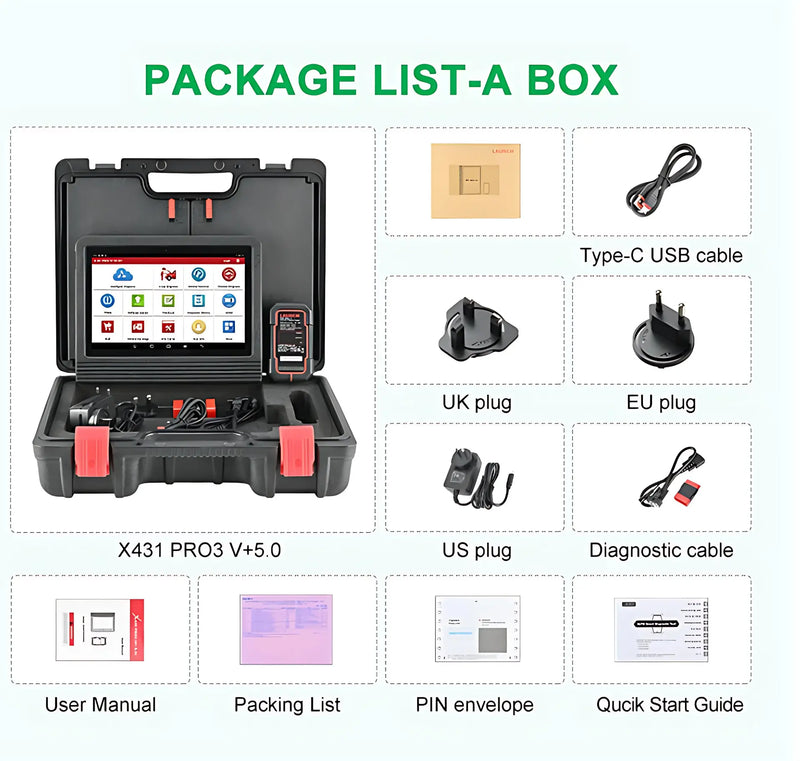
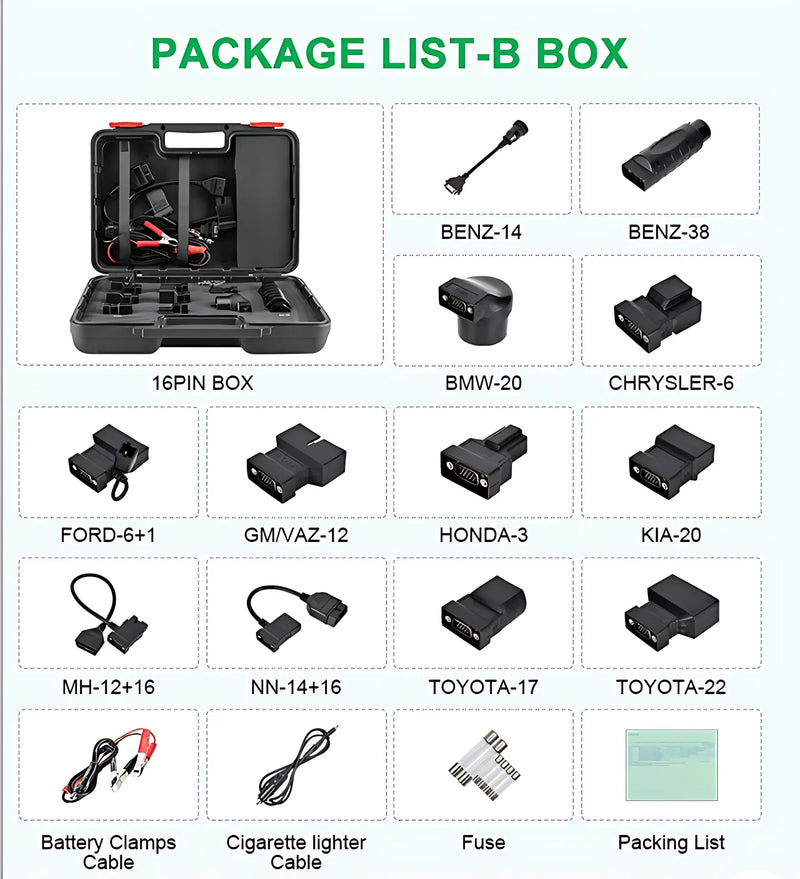
Lo que Incluye
Galería del Producto
🔧 Ajuste Universal — Compatible con la mayoría de vehículos
Por favor verifica la compatibilidad antes de comprar. Contáctanos con tu VIN para confirmación.
⚠ Nota de compatibilidad
Para confirmar la compatibilidad específica con su vehículo, envíe su número de bastidor (VIN) o los detalles de su vehículo a support@evparts4x4.com; verificaremos la compatibilidad de diagnóstico en 24 horas.
¿No estás seguro de la compatibilidad? Contáctanos — confirmaremos en 24 horas.
Tiempo total
5 minutos
Requiere taladrar
No, de conectar y usar.
Garantía
Sí, no invasivo
El X431 V+ 5.0 está diseñado para soportar todos los sistemas de vehículos, incluidos los vehículos eléctricos, con diagnósticos a nivel de equipo original para más de 150 marcas y el 99% de los vehículos globales. Maneja el diagnóstico completo del sistema para motor, ABS, SRS, TPMS y más, lo que lo hace adecuado tanto para trenes motrices tradicionales como eléctricos.
El Mapa de Topología del Sistema proporciona una visión general visual y codificada por colores de todos los sistemas del vehículo para ayudarle a identificar rápidamente las estructuras de comunicación y localizar las fallas. El verde indica sistemas normales, mientras que el rojo resalta las fallas, lo que le permite navegar directamente a las áreas problemáticas y leer los códigos de diagnóstico más rápido.
Sí, el X431 V+ 5.0 es compatible con coches de 12V y camiones de servicio pesado de 24V con diagnósticos a nivel de equipo original. El cable conector de diagnóstico está diseñado para funcionar de forma segura con ambos sistemas de voltaje, por lo que puede diagnosticar una amplia gama de vehículos comerciales y de pasajeros.
Sí, la herramienta incluye capacidades avanzadas de codificación y programación de ECU con codificación en línea, programación fuera de línea y funciones de ECU que permiten flashear características ocultas, personalizar configuraciones y reprogramar datos adaptativos después del reemplazo de componentes. Esto es particularmente útil después de reemplazar componentes importantes como módulos de control o sensores.
El X431 V+ 5.0 incluye más de 45 funciones de mantenimiento que cubren reparaciones rutinarias y complejas, como codificación de inyectores, regeneración de DPF, reinicio de aceite, EPB, BMS y llaves IMMO. Además, la función de control bidireccional le permite enviar comandos directamente a las ECU y realizar pruebas activas en bombas de combustible, frenos, aire acondicionado, ventanas y otros componentes sin depender de los controles del vehículo.
Usa el selector de vehículo en la parte superior de esta página para confirmar la compatibilidad con tu año, marca y modelo específicos. Si tu vehículo no está listado o no estás seguro, contáctanos en support@evparts4x4.com con tu VIN — confirmaremos la compatibilidad en 24 horas. Nuestra política de Ajuste Garantizado significa que si hay un problema de compatibilidad de nuestra parte, lo solucionaremos.
Los pedidos se procesan y despachan en 2-4 días hábiles. Las piezas estándar se envían por correo aéreo y normalmente llegan en 10-15 días hábiles; las piezas de carrocería más grandes se envían por flete marítimo y tardan alrededor de 30-45 días hábiles. El envío es gratis en pedidos superiores a $100. Recibirás un número de seguimiento una vez que tu pedido sea enviado, y puedes rastrearlo en cualquier momento aquí. Detalles completos en nuestra Política de Envío.
Sí — ofrecemos una ventana de devolución de 30 días desde la fecha de entrega, y no cobramos ningún cargo de reposición. Si un artículo llega dañado o no es correcto por nuestra parte, organizaremos un reemplazo o reembolso completo y cubriremos el envío de devolución. Para los términos completos, consulta nuestra Política de Devolución y Reembolso o inicia una devolución a través de nuestra página de RMA.
No proporcionamos instalación directamente, pero la mayoría de nuestras piezas están diseñadas para una instalación DIY directa — la guía paso a paso está en la pestaña de Guía de Instalación arriba. Para piezas complejas (por ejemplo, frenos, suspensión, sistemas eléctricos), recomendamos que un mecánico calificado realice la instalación. Si tienes preguntas técnicas durante la instalación, nuestro equipo de soporte está feliz de ayudar en support@evparts4x4.com.
